Top 7 Must-Do AI Tools for Developer Productivity in 2026

AI coding tools have moved well beyond autocomplete.
The leading products can now inspect repositories, plan changes, edit multiple files, run terminal commands, review pull requests and complete development tasks in the background.
That does not mean every developer needs several subscriptions. The real decision is which tool fits your workflow, technical environment, security requirements and monthly budget.
Quick verdict: Which one should you choose?
For most professional developers and software teams, GitHub Copilot is the safest starting point. It supports established development environments, integrates closely with GitHub and can be introduced without forcing developers to adopt a new editor.
Choose Cursor if you want an AI-first development environment and expect to delegate larger coding tasks to agents. Choose Claude Pro with Claude Code if your work involves software architecture, codebase analysis, documentation and complex technical reasoning as well as code generation.
Who should buy what?
- Choose GitHub Copilot if: You want broad IDE compatibility, GitHub integration and a relatively low entry price.
- Choose Cursor if: You want an AI-first editor with strong multi-file and autonomous agent workflows.
- Choose Claude Pro if: You need deeper code analysis, planning, documentation and architectural reasoning.
- Choose JetBrains AI if: Your team already works primarily in IntelliJ IDEA, PyCharm, Rider or WebStorm.
- Choose OpenAI Codex if: You already pay for ChatGPT and want coding agents across the terminal, IDE and cloud.
- Choose Windsurf if: You want an alternative AI-native editor centred on agent-led development.
- Choose Amazon Q Developer if: Your development and operational environment is heavily based on AWS.
The top seven at a glance
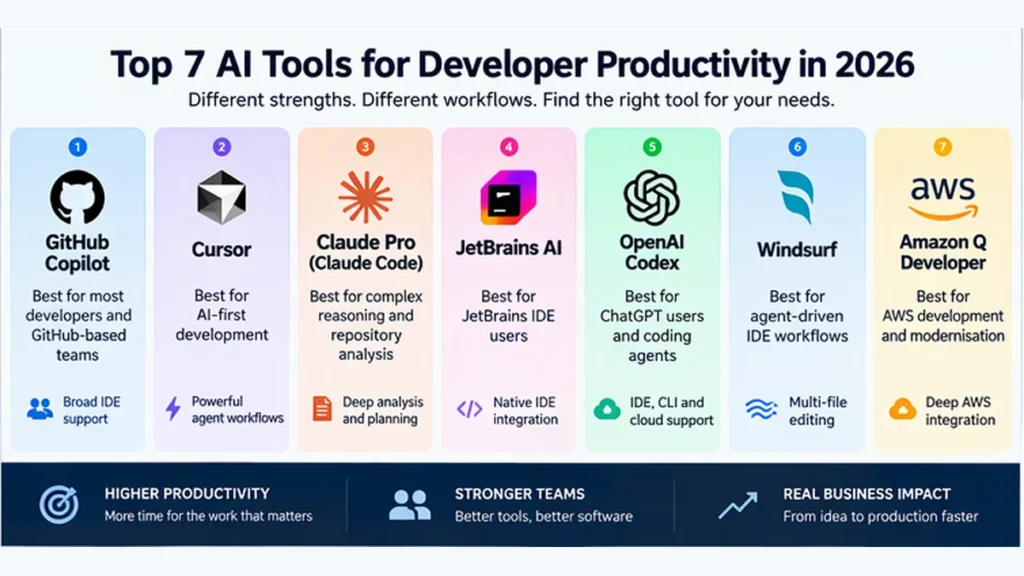
| Rank | Tool | Entry paid plan | Best for | Main limitation |
|---|---|---|---|---|
| 1 | GitHub Copilot | £7.50 per month | Most developers and GitHub-based teams | Agent use can consume metered AI credits |
| 2 | Cursor | £6 per month, although £22.50 Premium is more suitable for professional use | AI-first development | Third-party models may create additional charges |
| 3 | Claude Pro and Claude Code | Approximately £15 per month, or £12.70 monthly with annual billing | Complex reasoning and repository analysis | Limits vary by model and workload |
| 4 | JetBrains AI | Approximately £74.50 per year for AI Pro | JetBrains IDE users | Frequent agent use consumes credits |
| 5 | OpenAI Codex | Included with ChatGPT plans, with ChatGPT Plus at approximately £20 per month for UK customers | Terminal, IDE and cloud coding agents | Shared and model-dependent usage limits |
| 6 | Windsurf | Approximately £15 per month | Agent-driven IDE workflows | Daily and weekly quotas can be difficult to forecast |
| 7 | Amazon Q Developer | Approximately £14.20 per user per month | AWS development and application modernisation | Its strongest advantages are AWS-specific |
Pricing was checked against published vendor information available in November 2026. Prices are normally quoted in US dollars and may exclude VAT and other applicable fees.
Key features and comparison
| Tool | API and model flexibility | Ease of adoption | Automation potential | Team governance | Best fit |
|---|---|---|---|---|---|
| GitHub Copilot | High | High | High | Strong on business plans | Existing GitHub teams |
| Cursor | High | Medium | Very high | Stronger on team and enterprise plans | AI-first developers |
| Claude Pro | High | Medium | High | Team and Enterprise plans available | Architects and senior engineers |
| JetBrains AI | High | Very high for existing users | Medium to high | Central organisational controls | JetBrains environments |
| OpenAI Codex | High | Medium | High | Business and Enterprise options | Existing ChatGPT users |
| Windsurf | High | Medium | High | Team and enterprise controls | AI-native IDE users |
| Amazon Q Developer | High within AWS | High for AWS users | High for AWS workflows | AWS administration and identity controls | AWS-based teams |
1. GitHub Copilot
What it is
GitHub Copilot is an AI development assistant available across VS Code, Visual Studio, JetBrains IDEs, Eclipse, Xcode, the command line and GitHub.
It supports code completion, chat, multi-file agent workflows, pull request review and cloud-based coding agents.
Where it shines
- Low-friction adoption: Developers can continue using their preferred editor rather than migrate to a replacement development environment.
- Strong GitHub integration: Copilot can work with issues, review changes and prepare pull requests within established GitHub workflows.
- Competitive starting price: GitHub Copilot Pro costs approximately £7.50 per month before VAT, based on its US price of $10. Higher tiers cost approximately £29 per month for Pro+ and £74.50 per month for Max. GitHub bills agent, command-line, code-review and cloud activity through included AI credits, with additional usage potentially creating further charges. and includes unlimited code completion, next-edit suggestions, model selection and an allowance for AI-powered workflows.
Where it falls short
- Pricing is becoming more complicated: Agent mode, code review, command-line use and cloud workflows consume GitHub AI Credits. Additional usage can be billed according to the model and volume of tokens used.
- It can create false confidence: Generated code still requires testing, security scanning and human review. Copilot can accelerate implementation, but it does not take accountability for the result.
Best IT use case
A team using GitHub and VS Code can assign Copilot a clearly defined issue, ask it to implement the change and add tests, then review the resulting pull request through the normal approval process.
This works best when the repository already has:
- Clear issue descriptions
- Automated testing
- Documented coding standards
- Branch protection
- Secret and dependency scanning
- Mandatory human review
Who is it actually for?
GitHub Copilot is the strongest general recommendation for professional teams that want to improve developer productivity without redesigning their toolchain.
It is also a sensible first pilot for IT managers who need a broadly supported product with a route towards central administration.
2. Cursor
What it is
Cursor is an AI-first development environment built around repository understanding, multi-file editing, code review and autonomous coding agents.
The introductory Plus plan costs approximately £6 per month before VAT. However, the £22.50 Premium tier is the more realistic professional option because it adds cloud agents, automations, AI code review and access to third-party models. These are approximate conversions from Cursor’s published US-dollar prices.
Where it shines
- AI is central to the editor: Repository search, agent planning and multi-file changes are core parts of the interface.
- Strong autonomous workflows: Cursor can take on broader implementation tasks while the developer reviews its plan, changes and test results.
- Model flexibility: Premium and higher tiers support third-party models, allowing developers to choose between speed, cost and reasoning capability.
Where it falls short
- It requires an editor change: Developers who are heavily invested in JetBrains, Visual Studio or a customised VS Code environment may resist migration.
- The subscription may not be the final cost: Third-party models can be billed separately at API list prices using prepaid credit.
Best IT use case
A solo founder wants to add subscription billing to a TypeScript application.
Cursor can inspect the repository, identify existing authentication and database conventions, propose a plan, add the billing integration, create migrations and tests, and present the completed changes for review.
The developer remains responsible for validating webhook security, payment failure handling, permissions and personal-data processing.
Who is it actually for?
Cursor is best for developers who want to build their workflow around AI agents rather than simply add autocomplete to their current editor.
Teams should test Cursor against a representative repository before standardising on it. Its value depends on whether developers delegate substantial, bounded tasks rather than using it only for code suggestions.
3. Claude Pro and Claude Code
What it is
Claude Pro combines Anthropic’s general-purpose AI workspace with Claude Code, a coding agent that works from the terminal and across software repositories.
Claude Pro costs approximately £15 per month before VAT, or approximately £12.70 per month when paying the equivalent of £149 annually. UK-localised checkout prices may differ. Current UK references put Claude Pro at around £18 to £20 per month including VAT, depending on the purchase route.
Where it shines
- Strong planning and reasoning: Claude is useful for tracing unfamiliar code, evaluating design choices and producing implementation plans before changing files.
- Broader professional value: The same subscription can support architecture documentation, decision records, migration planning and incident analysis.
- Terminal-based workflow: Claude Code suits experienced developers who prefer to work directly with Git, build tools and command-line utilities.
Where it falls short
- Usage is not unlimited: Limits depend on the selected model, conversation length, repository size and attached files. Large codebases and long-running sessions consume capacity more quickly.
- API use is separate: A Claude Pro subscription does not include general API usage. API calls are billed independently according to input, output and caching rates.
Best IT use case
An IT architect inherits a poorly documented service and needs to understand it before approving a migration.
Claude Code can inspect the repository and help create:
- A component map
- A description of data flows
- A dependency inventory
- Potential security concerns
- Test-coverage gaps
- Migration risks
- A phased remediation plan
The findings must still be validated against the running environment, infrastructure configuration and operational knowledge.
Who is it actually for?
Claude Pro is best for senior engineers, architects and founders whose work combines coding with analysis, planning and documentation.
If the requirement is primarily rapid inline code completion, a lower-cost IDE assistant may provide better value.
4. JetBrains AI
What it is
JetBrains AI provides completion, chat and coding agents inside products including IntelliJ IDEA, PyCharm, WebStorm and Rider.
Its available agents include Junie, Claude Agent, Codex and Gemini. JetBrains also supports bring-your-own-key configurations and external agents through compatible protocols.
Where it shines
- Native IDE context: It works alongside JetBrains inspections, refactoring tools, database tooling and project models.
- Multiple agent options: Developers can use JetBrains services or connect compatible third-party providers.
- Useful entry tier: AI Free includes unlimited IDE completion and a small monthly credit allowance where the free tier is available.
Where it falls short
- Agent use consumes credits: Frequent autonomous work may require additional credit purchases.
- The IDE cost also matters: Organisations not already using commercial JetBrains products must consider the combined cost of the IDE and AI service.
Best IT use case
A Java team using IntelliJ IDEA can ask an agent to trace a Spring service, update an interface and its implementations, adjust the relevant tests and validate the result using the existing build configuration.
Who is it actually for?
Choose JetBrains AI when JetBrains products are already central to the development environment.
Migrating to JetBrains solely for its AI features is harder to justify unless the broader IDE capabilities also deliver value.
5. OpenAI Codex
What it is
Codex is OpenAI’s coding-agent environment across ChatGPT, the command line, IDE integrations and cloud-based workflows.
Codex is included with ChatGPT plans. For UK customers, ChatGPT Plus typically costs approximately £20 per month including VAT, although the final price can depend on whether the subscription is purchased through the website, Apple App Store or Google Play
Where it shines
- Good value for existing ChatGPT customers: Coding sits alongside research, document analysis and general productivity features.
- Flexible working environments: Developers can use Codex locally, through an IDE or through cloud-based tasks.
- Well suited to bounded delegation: Codex can handle defined jobs such as fixing tests, refactoring a module or preparing a reviewable change.
Where it falls short
- Limits vary by model: Local messages and cloud activity can share plan allowances, and weekly limits may apply.
- Cloud access requires careful governance: Repository permissions, network access, secrets and generated changes must be controlled explicitly.
Best IT use case
Codex can inspect a failed continuous-integration run, reproduce the issue, identify the relevant code and tests, and prepare a candidate fix for human review.
Who is it actually for?
Codex is a sensible option for developers already paying for ChatGPT Plus, Business or Enterprise.
Before buying another product, check whether the organisation’s existing ChatGPT plan already covers the required workflow.
6. Windsurf
What it is
Windsurf is an AI-native editor built around Cascade, its agentic development workflow.
It combines inline completion, multi-file editing, application previews and cloud development sessions. Current plans use daily and weekly quotas rather than the previous monthly credit model.
The main individual tiers are Free, Pro at approximately £15 per month before VAT, and Max at approximately £149 per month before VAT.
Where it shines
- Strong multi-file workflow: Cascade can coordinate changes across several parts of a codebase.
- Unlimited inline completion: Tab completion does not consume the main agent quota.
- Integrated previews: Developers can build and review application changes without constantly moving between separate tools.
Where it falls short
- Quota capacity can be unclear: Consumption varies by model and task, making practical monthly usage difficult to predict.
- There is a large jump to Max: At approximately £149 per month before VAT, Max needs to support substantial daily use to provide convincing value.
Best IT use case
A small product team can use Windsurf to implement a feature across the frontend and backend, preview the application, run tests and review the combined change before opening a pull request.
Who is it actually for?
Windsurf is aimed at developers who want an AI-native editor but prefer Cascade’s working model to Cursor’s agent workflow.
The best evaluation method is to test Cursor and Windsurf against the same repository and task.
7. Amazon Q Developer
What it is
Amazon Q Developer is AWS’s AI assistant for coding, command-line work, AWS troubleshooting and application transformation.
The free tier includes 50 agentic requests per month and 1,000 lines of application transformation. Amazon Q Developer Pro costs approximately £14.20 per user per month before VAT. It includes higher limits, administrative controls, IAM Identity Center support and intellectual-property indemnity.
Where it shines
- Deep AWS alignment: It is useful for Lambda, IAM, CloudFormation, CDK and operational troubleshooting.
- Application modernisation: It can support eligible Java and .NET upgrade work.
- Organisational controls: Pro includes central policy management, administrative reporting and automatic opt-out from data collection.
Where it falls short
- It is less differentiated outside AWS: General software-development tasks may be better served by Copilot, Cursor or Claude Code.
- Transformation overages apply: The Pro allowance includes 4,000 transformation lines per user, pooled at AWS account level. Additional eligible transformation work is charged at approximately £0.0022 per line, equivalent to around 22p for every 100 additional lines. The exact sterling charge will depend on the AWS billing exchange rate.
Best IT use case
An AWS-based organisation can use Amazon Q Developer to diagnose deployment problems, explain IAM issues and assist with a Java runtime upgrade while retaining AWS-aligned identity and administration.
Who is it actually for?
Amazon Q Developer is primarily for AWS-heavy development and operations teams.
Having an AWS account is not enough reason to choose it. The value comes from regular use of AWS infrastructure, tooling and application-modernisation services.
Real-world workflow: Combining Claude Code and GitHub Copilot
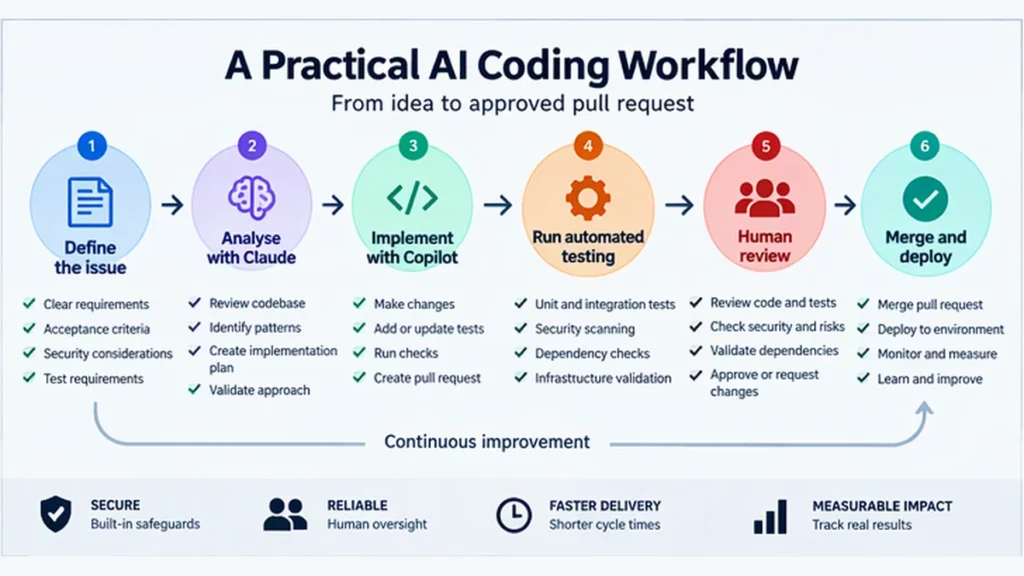
The most effective approach is not to let two agents independently modify the same code.
Give each product a defined role and keep a human accountable for the final result.
Step 1: Define the outcome
Create a GitHub issue containing:
- Required behaviour
- Acceptance criteria
- Affected users
- Security requirements
- Expected error handling
- Test requirements
- Explicitly excluded work
For example:
Add a read-only customer-status endpoint with role-based access, request logging and integration tests. Do not modify the underlying customer database schema.
Step 2: Use Claude Code for analysis
Ask Claude Code to inspect the repository without making changes.
Request:
- Relevant components and dependencies
- Existing implementation patterns
- Proposed file changes
- Security considerations
- Test approach
- Assumptions requiring confirmation
Review the plan before authorising implementation.
Step 3: Add repository instructions
Create project-level instructions covering:
- Supported language and framework versions
- Approved libraries
- Coding conventions
- Restricted directories
- Test commands
- Secret-handling requirements
- Pull request expectations
This reduces repeated prompting and prevents avoidable assumptions.
Step 4: Delegate implementation
Give the approved task to GitHub Copilot through agent mode or an assigned issue.
Require it to:
- Work in a separate branch.
- Implement only the approved scope.
- Add or update tests.
- Run formatting and static analysis.
- Document assumptions and unresolved errors.
- Prepare a pull request for review.
Step 5: Run automated controls
The pipeline should include:
- Unit and integration tests
- Dependency vulnerability scanning
- Secret scanning
- Static application security testing
- Open-source licence checks
- Infrastructure validation where relevant
AI-generated code should never receive weaker controls than human-written code.
Step 6: Use AI to challenge the result
Ask one of the tools to review:
- Authentication and authorisation
- Error handling
- Personal-data exposure
- Concurrency and race conditions
- Backwards compatibility
- Missing tests
- Unnecessary dependencies
Treat the output as review guidance, not approval.
Step 7: Complete human review
The accountable developer must verify:
- The complete diff
- Test results
- Dependency changes
- Database changes
- Security implications
- Deployment and rollback requirements
Step 8: Measure productivity
Track:
- Time from issue creation to first pull request
- Time spent reviewing generated code
- Number of review cycles
- Escaped defects
- Test coverage
- Agent cost per completed issue
- Percentage of generated code substantially rewritten
If implementation becomes faster but review work and defects increase, the workflow is not delivering meaningful productivity.
💡 Must-Do Automation Tip
Save hours building custom workflows. Get reusable coding, automation and review templates in the £29 AI Automation & Prompt Library.
[VIEW THE AI AUTOMATION & PROMPT LIBRARY]
Pricing and value for money
Current pricing summary
| Tool | Free option | Practical paid plan | Team scaling | Main hidden cost |
|---|---|---|---|---|
| GitHub Copilot | Free tier available | Pro at approximately £7.50 per month | Business and Enterprise plans | Agent and premium-model usage beyond included credits |
| Cursor | Limited chat and agent requests | Premium at approximately £22.50 per month | Teams from approximately £22.50 per user per month | Third-party model usage |
| Claude | Limited usage | Pro at approximately £15 monthly before VAT, or around £12.70 monthly with annual billing | Team and Enterprise plans | Separate API charges and variable limits |
| JetBrains AI | Unlimited completion plus three monthly credits | Pro at approximately £74.50 per year | Organisational credit pools and governance plans | Top-up credits and the underlying IDE |
| OpenAI Codex | Limited ChatGPT Free access | ChatGPT Plus at approximately £20 per month including UK VAT | Business and Enterprise plans | Model-dependent limits and extra credits |
| Windsurf | Light usage quota | Pro at approximately £15 per month | Teams and Enterprise plans | Extra usage and quota uncertainty |
| Amazon Q Developer | 50 monthly agentic requests | Pro at approximately £14.20 per user per month | AWS account-level administration | Application-transformation overages |
Vendor pricing and usage conditions are subject to change.
UK purchasing considerations
Prices in this article are shown in pounds sterling for easier comparison, but not every provider publishes a fixed UK price.
What would a five-developer team cost?
Several services continue to bill in US dollars. The amount charged to a UK customer can therefore vary because of:
- Exchange-rate movement
- UK VAT
- Foreign-transaction fees
- The card or payment provider used
- Website versus app-store pricing
- API, token or agent overages
- Additional organisational and security services
At the exchange rate used for this article, US$20 converts to approximately £14.93 before VAT. With 20% VAT, the indicative cost becomes approximately £17.92, before any card-provider fee.
Where a provider offers a fixed UK price, use that price instead. For example, ChatGPT Plus is commonly listed at approximately £20 per month including VAT for UK customers
Approximate monthly list prices before VAT and overages:
| Product | Approximate monthly cost for five users before VAT |
|---|---|
| GitHub Copilot Pro | £37.50 |
| Cursor Premium | £112 |
| Claude Pro | £75 |
| JetBrains AI Pro with annual billing | £31 |
| ChatGPT Plus with Codex | £100 Already approximately VAT-inclusive |
| Amazon Q Developer Pro | £71 |
This is not a like-for-like enterprise comparison.
Individual subscriptions may not include the central administration, audit capability, identity controls, procurement terms and data protections required by an organisation.
The real value test
Do not assess value only by subscription price.
A higher-priced tool can still offer good value if it reliably saves several productive hours each month without increasing defects or review effort. A cheaper tool is poor value if most suggestions are rejected or substantially rewritten.
Use this calculation:
Monthly value = hours saved × loaded hourly cost − licence cost − additional review and remediation cost
For example, four hours saved each month at a loaded developer cost of £60 per hour creates £240 of gross capacity.
That does not automatically produce a £240 financial saving. The organisation only realises the value if the released capacity is used for additional delivery, technical debt reduction, improved testing or faster customer outcomes.
Risks IT managers should not ignore
Tool overlap
GitHub Copilot, Cursor, Claude Code and Codex increasingly cover similar tasks.
Buying several products for every developer is rarely justified. Select one primary coding assistant and approve additional tools only where there is a defined requirement.
Uncontrolled usage costs
Long agent sessions can read large repositories, generate extensive output and use expensive models.
Set:
- Monthly budgets
- Overage limits
- Approved models
- Usage alerts
- Cost reporting by team or repository
Repository and data exposure
Review how prompts, source code, logs and telemetry are processed.
Your assessment should cover:
- Provider training commitments
- Data residency
- Retention periods
- Subprocessors
- Access logs
- Single sign-on
- User offboarding
- Secret exposure
- Contractual restrictions on source code
False productivity
More generated code does not necessarily mean more business value.
Measure maintainable, secure and completed changes rather than lines of code or number of AI sessions.
Dependency risk
Agents may introduce unnecessary packages, outdated patterns or excessive complexity.
Require explicit approval for:
- New dependencies
- Framework changes
- Authentication changes
- Database migrations
- Infrastructure changes
- Production deployment actions
Final verdict
Best overall: GitHub Copilot
GitHub Copilot is the best default for most professional developers and IT-managed teams.
It combines a relatively low entry cost, broad development-environment support and a practical route from individual productivity to centrally governed organisational use.
Best AI-first editor: Cursor
Cursor is the stronger option when developers want agents to become central to implementation.
Its main trade-offs are editor migration, overlapping subscriptions and potentially less predictable model costs.
Best for analysis and architecture: Claude Pro
Claude Pro offers strong value for senior engineers and technical leaders whose work includes architecture, troubleshooting, documentation and code.
It can complement Copilot effectively, but the combination should be justified by measured usage rather than provided to everyone by default.
Best for existing ecosystems
- JetBrains teams: Start with JetBrains AI.
- AWS-heavy teams: Evaluate Amazon Q Developer.
- Existing ChatGPT customers: Test Codex before purchasing another subscription.
- AI-native editor users: Compare Cursor and Windsurf on the same representative project.
Recommended next steps
- Select one primary tool based on your existing development environment.
- Run a four-week pilot with five to ten developers.
- Use real development tasks, not demonstration exercises.
- Apply normal security, testing and review controls.
- Measure delivery time, review effort, defects and total cost.
- Expand only where measurable value is demonstrated.
- Reassess product capability and pricing every six months.
The goal is not to maximise AI usage.
The goal is to improve delivery speed, code quality and developer focus without losing control of cost, security or accountability.
Start with the lowest-friction option
For most development teams, GitHub Copilot is the practical first product to evaluate.
It works within established development environments and can be introduced without replacing the team’s editor or Git workflow.
[TRY GITHUB COPILOT: INSERT AFFILIATE LINK HERE]
Explore more practical AI tools, workflow guides and automation resources at i-mustdo.com.
Affiliate disclosure: Some links on this page may be affiliate links. If you purchase through one of these links, i-mustdo.com may receive a commission at no additional cost to you. Product rankings and recommendations are based on practical usefulness, cost, controls and intended use.